
In SETTINGS → STARNAPP → MY INVOICES we manage the relationship with StarNapp: the active user seats and the invoices StarNapp issues to us. This is not the sales module: the invoices we issue to our customers are not here.
How do we get there?
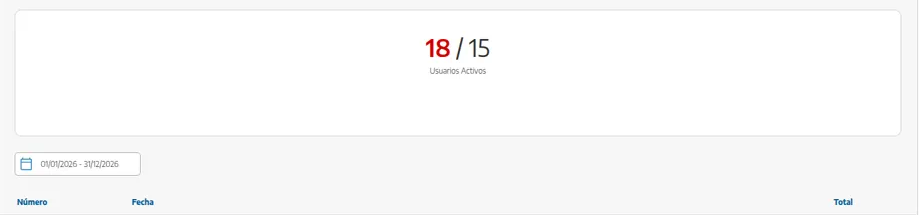
We'll go to SETTINGS → STARNAPP → MY INVOICES. At the top we'll see the user seats; below, the history ready to filter by dates and download.
How does it work?
StarNapp is billed by plan and by number of users. The plan decides which features we have: in the rest of these guides, anything marked 🔒 (several companies, locations and teams, accounting integrations, automatic bank connection, and so on) is on Advance or Enterprise. Upgrading the plan from this screen applies immediately.
The billing details of the subscription (legal name, tax ID, address StarNapp invoices us to) are independent of the company records we use to invoice our customers. If they change, we update them here so the next StarNapp invoices come out correctly.
How do we check or upgrade the plan?
We'll go to SETTINGS → STARNAPP → MY INVOICES.
We'll check the active user seats (contracted versus people already added).
If we need a feature marked 🔒, we'll upgrade the plan from the subscription flow in this area. The change does not wait for a long billing cycle: it applies at once.
We'll check that the subscription billing details (who receives StarNapp's invoice) are up to date: tax ID, legal name, sending email.
If we contract more users, we'll do it here — not by adding extra employees without seats. Adding people is in Add a user / employee; the seat count is on this screen.
How do we download StarNapp invoices?
In MY INVOICES is the history of what StarNapp has billed us. We'll filter the period and download the PDF for the accountant.
We won't confuse them with:
Invoices to our customers, which live in Sales.
Collections our customers pay on those invoices, which are set up in Stripe payment gateway.
What should we keep in mind?
💡 Tip: If the accountant asks for tool invoices at year-end, they are all here: we'll download them in one go instead of hunting through email.
“Locations / Xero / the connected bank doesn't work” is often a plan issue, not a bug on the locations screen. The 🔒 on each guide points here.
A user without access is not fixed by upgrading the plan: that is fixed in Roles and permissions. Upgrading the plan only gives seats and product features.
Changing our company record under COMPANIES does not automatically change the details StarNapp uses to invoice the subscription: they are two different blocks.