
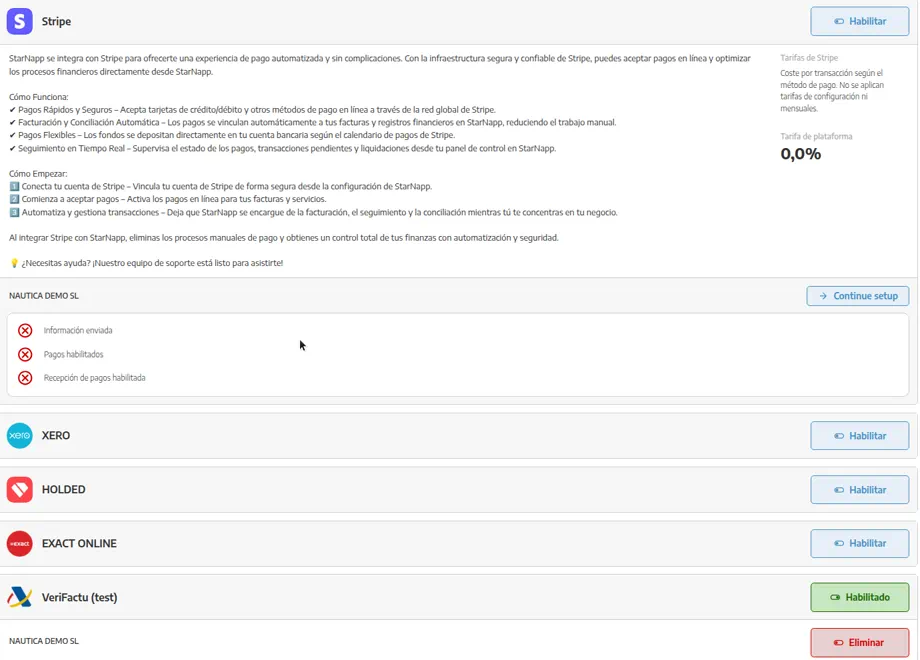
In SETTINGS → CONFIGURATION → INTEGRATIONS we connect StarNapp to external tools. Stripe (customer collection) and ERPs (Xero, Holded, Exact…) are on the same screen. We'll pick the guide that matches the job:
Accounting (Xero, Holded, Exact Online…): documents sync to the accountant's software. Advance and Enterprise plans. → Accounting integrations
Payment gateway: the customer pays the invoice online with Stripe. → Stripe payment gateway
How do we get there?
We'll go to SETTINGS → CONFIGURATION → INTEGRATIONS. Stripe is usually at the top; below, the accounting platforms and, if it applies in our country, an e-invoicing connector.
Which one do we use?
“Invoices don't reach Holded / Xero / Exact” → Accounting integrations.
“The customer can't pay by card” or “the Stripe button doesn't appear” → Stripe payment gateway.
Bank-transfer IBAN and collection terms are not set here: Treasury: banks, terms and payment methods.
Invoices StarNapp issues to us are in StarNapp subscription and invoices.
What should we keep in mind?
🔒 Availability: Accounting integration is Advance/Enterprise. Customer Stripe is turned on from this same Integrations area; we won't confuse it with the StarNapp subscription.
Connecting both does not merge them: a document can be paid in Stripe and not yet posted in the ERP, or the other way around.