
If the books are kept in Xero, Holded, Exact or another connected ERP, in SETTINGS → CONFIGURATION → INTEGRATIONS we enable StarNapp so we don't retype sales and purchase invoices. The gateway the customer pays the PDF with is something else: Stripe payment gateway. The index of both is in Integrations: accounting and payment gateway.
How do we get there?
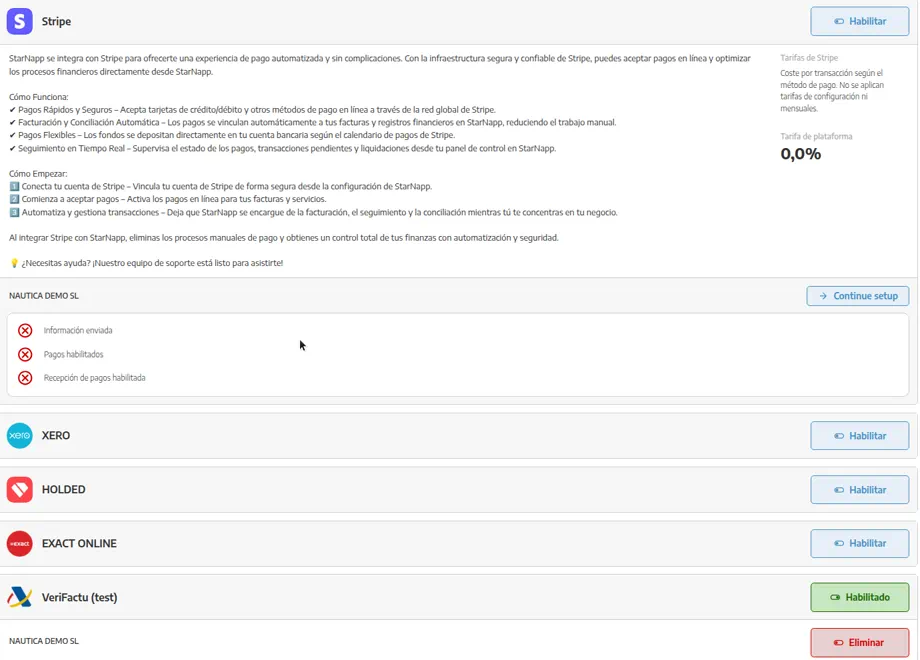
We'll go to SETTINGS → CONFIGURATION → INTEGRATIONS. On the same screen are Stripe (customer collection) and the accounting platforms. Each company in the account can have its own connection.
How does it work?
The integration syncs sales and purchase documents to the accountant's software. It does not replace setting up series, taxes and bank accounts properly: those masters feed the posting.
The finer split is refined in:
the LEDGER CODE of each series (Billing series and document numbering);
catalog families, if the accountant uses them that way (Set up catalog categories).
If the authorisation expires, we'll authorise it again from the same screen.
🔒 Availability: Accounting integrations are enabled on Advance and Enterprise. The plan is checked in StarNapp subscription and invoices.
How do we connect accounting?
We'll go to SETTINGS → CONFIGURATION → INTEGRATIONS and pick Xero, Holded or Exact Online (or another platform that appears on that screen).
We'll press ENABLE and authorise access on the accounting software's screen.
We'll complete whatever StarNapp asks when we come back (account mapping, if it appears).
We'll sync a few test documents and check the posting before we trust the connection.
If there are several entities, we'll repeat the connection on each company. Connecting the yard does not connect charter.
💡 Tip: We'll do the connection with the accountant. Account mapping affects them directly.
What should we keep in mind?
“Posted” on a sales document is not the same as “paid” by Stripe. If we use both, we'll confirm with the accountant how the collection enters.
A wrong tax ID or series is carried into the ERP: first Set up your company information and the series, then the integration.
An e-invoicing connector may also appear on this Integrations screen, depending on the country.