
Tags are StarNapp's free classification: colour labels we assign to a specific type of record so we can filter it later. “VIP customer”, “Charter fleet”, “Maintenance” — we decide the criteria. A vessel tag does not appear on a contact, and the other way around.
How do we get there?
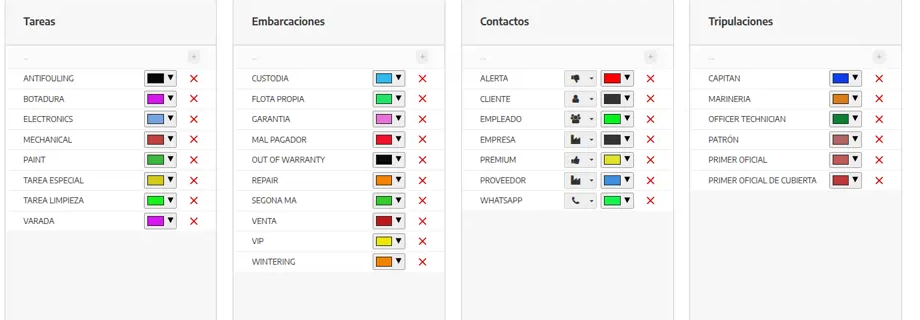
We'll go to SETTINGS → CONFIGURATION → TAGS. We'll see one column per type: TASKS, VESSELS, CONTACTS and CREW.
How does it work?
Each tag has a name, a colour and a type. The type is the column: they don't mix across lists.
TASKS: work types when we create a work order (winterisation, maintenance, repair…). The work-order form picks them in the TAGS field. Detail in Task and project categories.
VESSELS: fleet, waiting for haul-out, for sale, and so on. How to assign them to the boat is in Tags on vessels.
CONTACTS: customers and suppliers (VIP, late payer, charter, regular supplier…). This column can also have an icon.
CREW: if we classify crew separately from general contacts.
Lists can be filtered by tag. A short, agreed taxonomy turns tags into work views: “all VIPs”, “all winterisations”.
Tags do not replace tax fields or document statuses: don't use a “Invoiced” tag instead of the quote status.
How do we create and assign a tag?
We'll go to SETTINGS → CONFIGURATION → TAGS and stay in the column for that type (tasks, vessels, contacts or crew).
We'll press + and complete:
NAME: short and unique. The whole team should mean the same thing.
COLOUR: to recognise it at a glance on lists and records.
On CONTACTS, the icon if we also want to tell them apart by symbol.
From the matching list or record, we'll click the tags area and tick them. On vessels we can do it both in the list column and on the boat profile.
What should we keep in mind?
⚠ Important: When we delete a tag, every item that had it is unlinked from it. The action does not delete contacts or boats: it only removes that classification.
💡 Tip: A few tags with a clear meaning are worth more than many improvised ones. We'll agree with the team what each one means before we create it.
If a tag doesn't appear on a contact, it was almost certainly created in another column (for example, vessels).
Catalog categories and stock warehouses are not tags. See Set up catalog categories and Warehouses.