In SETTINGS → BILLING → BILLING SERIES we define series: document type, issuing company, format and numbering. Keep invoice numbers sequential: we shouldn't skip numbers or reuse one already issued. The look of the PDF (standard, minimal or centred template) is not chosen here: it's in Nautical preferences.
We'll go to SETTINGS → BILLING → BILLING SERIES. First we pick the DOCUMENT TYPE (quotes, work orders, delivery notes, proformas, invoices, purchase orders…); then the series for that company; on the right we edit its fields.
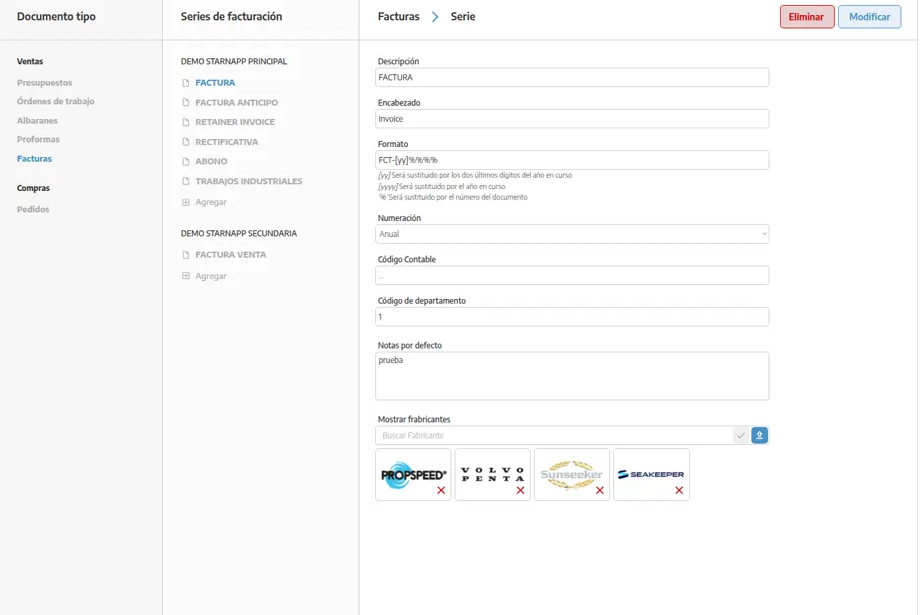
A series is the mould of one document type for one company:
It belongs to a single document type (we don't mix invoices and quotes in the same series).
It is linked to one company. Tax details and the PDF logo come from that company, not from a logo of the series itself.
It has a numbering format (`P-%%%%%%`, `F-%%%%%%`, `ATP-[yy]%%%%`…).
If we turn on ANNUAL NUMBERING, the counter resets each year. The `[yy]` token is replaced by the last two digits of the year.
When we create a document, we choose the series: that decides company, logo, numbering, the PDF label and default notes. IBAN and payment text are not edited here: they come from Treasury: banks, terms and payment methods. The legal clause comes from the company record (LEGAL NOTE).
We'll select the series or press create, and fill in:
DESCRIPTION: how we'll recognise it in StarNapp (“Invoice”, “Deposit invoice”). If we have several companies, the company should be obvious in the name.
DOCUMENT TYPE: chosen from the left-hand column (quote, delivery note, proforma, invoice, work order…). Each series belongs to one type.
COMPANY: the record whose tax details and logo will appear on documents in this series. In the list, series are already grouped by company.
FORMAT: each `%` is a digit. `[yy]` is the last two digits of the year; `[yyyy]` is the full year. `FCT-[yy]%%%%` becomes FCT-260001 in 2026.
NUMBERING: ANNUAL resets the counter each year. We need to match it with the format so numbers from different years don't collide. When migrating from another system, we'll set the next number after the last invoice already issued (if the form asks for it when creating or after EDIT).
HEADER: the name on the PDF (“Invoice”, “Factura”…).
DEFAULT NOTES: text added to every document in the series.
LEDGER CODE: code for integrations and exports to the accountant.
DEPARTMENT CODE: analytical split if the accountant uses it.
With SHOW MANUFACTURERS we add brand logos at the foot of the document. If we are an official service or dealer, seeing them on the PDF looks professional. We'll search for the brand — many are already loaded — and if it isn't there, we'll ask for it to be added. Because it's per series, we can show different brands per line of business.
⚠ Important: The logo at the top of the document is the company linked to the series. If the PDF shows another image, we'll change the series company (or that company's details). We won't look for a logo inside the series.
We won't reuse a number already issued, and we won't leave gaps on purpose in invoices.
A change of format or next number does not rewrite documents already created.
If the PDF looks like “another design” (cleaner, denser), it's the visual template in Nautical preferences, not a series field.
DEPARTMENT CODE and LEDGER CODE belong to the series; we won't mix them with the numbering format.
If the PDF has no IBAN or payment text, the setting is in TREASURY, not the series.
If the privacy or legal clause is missing, the text is in COMPANIES → LEGAL NOTE, not the series.
