
In a yard it's common to mix several tax treatments in the same week: a domestic customer at the standard rate, an exempt job, a cost paid on the customer's behalf, a withholding. In SETTINGS → BILLING → TAXES we'll register the taxes we actually use, so that when we create a document we only have to select them.
How do we get there?
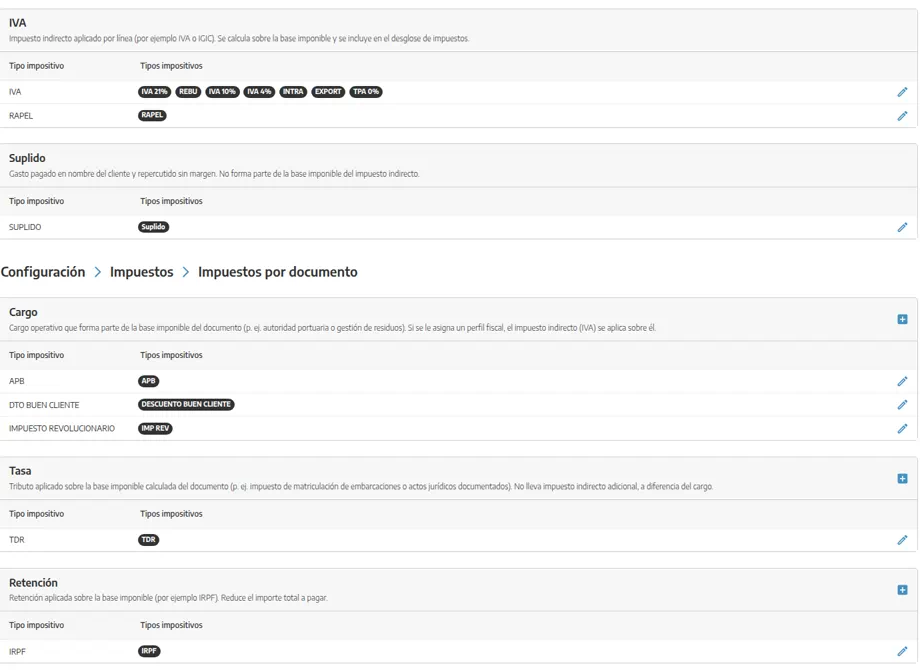
We'll go to SETTINGS → BILLING → TAXES. The screen splits LINE TAXES (VAT, disbursement) and DOCUMENT TAXES (charge, fee, withholding).
How does it work?
A tax is what we pick on the line or on the document. In Settings they are grouped like this (each block has its own help text on the screen):
Per line (they go on each document line):
VAT: the usual indirect tax (VAT or local equivalent). It is calculated on the taxable base and goes into the breakdown. Several rates can live in the same group (standard, reduced, 0%…).
DISBURSEMENT: a cost paid on the customer's behalf; it is not part of our taxable base. The operational detail is in Disbursed expenses.
Per document (they go on the total):
CHARGE: a surcharge or concept that is part of the base (for example a port fee). If it has a tax profile, VAT may apply on top of it.
FEE: a levy on the document base. Unlike a charge, it does not carry extra VAT.
WITHHOLDING: it is subtracted from the total.
Each account builds its own list: there is no fixed catalog. We'll only add the ones we use.
How do we create a tax?
In the matching block (VAT, disbursement, charge, fee or withholding) we'll press + or the pencil on a type already created, and complete what the form asks:
LABEL / TAX TYPE: the name we'll see when we select it (“VAT 21%”, “Withholding 15%”, “VAT 0% export”). If two rates share a percentage but a different treatment, we'll tell them apart in the label.
VALUE: the percentage. On exempt jobs it will be 0, but we still need the tax so the document carries the right mention.
WHERE IT APPLIES: the group (VAT, disbursement, charge, fee, withholding) decides whether it is per line or per document, and how it enters the PDF and the totals.
Ledger codes for catalog families (sales / purchases) are not set here: they are in Set up catalog categories.
What should we keep in mind?
💡 Tip: We'll only register the taxes we really use. A short list reduces billing mistakes; we can always add more when a new case appears.
A 0% VAT is not the same as no tax: 0% records the exemption or regime on the document.
If a customer always has the same treatment, we'll also set it on their record (taxes / additional information), so we don't have to remember it on every document. See Taxes, discounts and extra customer information.
Issued invoices are usually not edited: a wrong tax is corrected with a credit or corrective document. See Credit notes and corrective invoices.