
For the planner to show real availability, StarNapp needs two different things: company holidays (nobody works) and absence types (vacation, sick leave, training…) that we later apply to each employee. In SETTINGS we configure the company calendar and the catalog of types; actual absences for each person are recorded in Employees.
How do we get there?
We'll go to SETTINGS → EMPLOYEES → ABSENCE MANAGEMENT.
On the right is the company calendar: days we mark as holiday appear in green.
On the left we configure the absence types we'll later use on employee records.
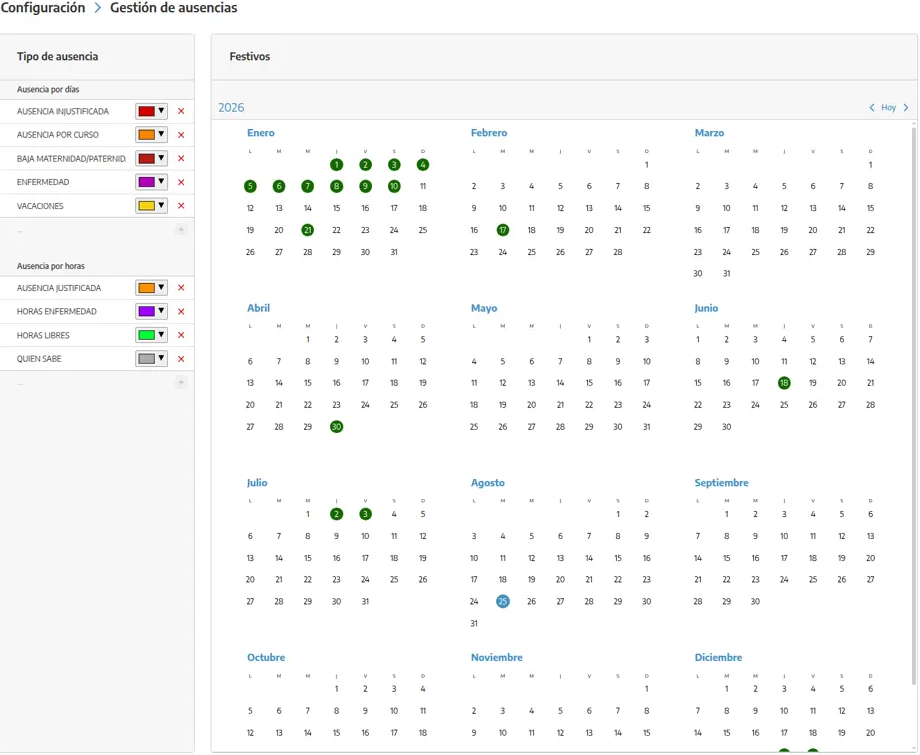
How does it work?
Company holiday: a specific day (1 January, a local holiday, a yard shutdown) that affects the whole team. The planner stops offering that day as a working day.
Absence type: the template (vacation, sick leave, a few hours at the doctor…). It is not yet “Maria from 3 to 12 August”: it is the concept we'll pick when we record that absence. We can create as many types as we need, of two kinds:
BY DAYS: vacation, a long weekend, several days off sick.
BY HOURS: a partial absence (doctor, a morning of training).
Individual absences (employee + type + dates or hours + comment) are created in the employees module: on the record, ABSENCES tab, or in the company-wide absences view. There the calendar is coloured by concept (vacation, justified, sick, unjustified) and there are day counters. The step-by-step is in Absence calendar.
How do we mark holidays and create types?
We'll go to SETTINGS → EMPLOYEES → ABSENCE MANAGEMENT.
On the calendar on the right, we'll select each non-working day for the company and mark it as HOLIDAY. Those days will turn green.
On the left, we'll create an ABSENCE TYPE and choose BY DAYS or BY HOURS. We'll give it a name the team recognises (“Vacation”, “Sick leave”, “Training”).
We'll create as many types as we really use. We don't need one per employee.
When we need to record that someone is away, we'll go to EMPLOYEES → ABSENCES (or that person's record) and use the type we just created.
What should we keep in mind?
💡 Tip: We'll record vacation as soon as it is approved, not when it starts. High-season planning is done months ahead, and an unrecorded absence is a badly assigned work order.
A company holiday is not put on each employee's record: it is marked once on this calendar.
If the planner still offers someone who is on vacation, the missing piece is the record in Absence calendar, not a new holiday.
Hour-based types let us avoid blocking the whole day when only a few hours are missing.
Deleting or changing dates of an absence already entered is done on the employee calendar (or the company-wide view), not on this types screen.